



































Skip to content
Home / Services

Verification Services

PersonVideo ID offers remote video identity verification options for businesses onboarding customers online. Each service is designed around guided sessions, document review, face comparison and practical operational support.

Verification Services
Live Video KYC

Live Video KYC

A trained agent guides the customer through a short live session to review identity details before onboarding continues.

ID Document Capture

ID Document Capture

Customers are guided to present an identity document clearly so key details and security features can be viewed on video.

Passport Video Check

Passport Video Check

The session supports passport presentation and review as part of remote onboarding for eligible customer journeys.

Face Match Review

Face Match Review

An agent compares the face on camera with the document image as part of a human-reviewed identity check.

Liveness Prompt Check

Liveness Prompt Check

Simple guided prompts help confirm that the person on camera is physically present during the verification session.

Consent Capture Flow

Consent Capture Flow

The process can include clear consent steps so customers understand the session and the handling of their records.

Session Record Keeping

Session Record Keeping

Session records can be retained in line with client process needs for audit trails and internal review.

New Account Checks

New Account Checks

This service supports identity verification at the point of opening a new customer account online.

High Risk Escalation

High Risk Escalation

Cases that need more attention can be routed for senior review under the client’s onboarding rules.

Manual Review Queue

Manual Review Queue

A manual review option helps clients route exceptions for additional checks before approval decisions are made.

After Hours Verification

After Hours Verification

Extended verification coverage helps businesses serve customers applying outside standard office hours.

Weekend Session Cover

Weekend Session Cover

Weekend session availability supports businesses that receive strong onboarding demand beyond weekdays.

Multilingual Agent Support

Multilingual Agent Support

Agent support can be arranged to improve customer guidance across common South African language needs.

Mobile Camera Journey

Mobile Camera Journey

A mobile-friendly journey helps customers complete guided video checks using a smartphone camera.

Browser Based Session

Browser Based Session

Customers can join a verification session through a browser-based flow without a complicated setup process.

Session Link Invite

Session Link Invite

Businesses can send customers a secure session link to begin verification at the right point in onboarding.

Appointment Booking Flow

Appointment Booking Flow

Scheduled appointments help clients manage verification demand and match staffing to onboarding volumes.

Instant Join Flow

Instant Join Flow

An instant join option supports customers who need to move straight from application to live verification.

Application Handoff Check

Application Handoff Check

The verification stage can be placed between form completion and internal approval within a client journey.

Repeat Customer Refresh

Repeat Customer Refresh

Existing customers can complete a refreshed identity session when the client requires an updated check.

Beneficial Owner Checks

Beneficial Owner Checks

Video verification can support identity checking for related individuals in business onboarding processes.

Director Identity Checks

Director Identity Checks

Directors involved in company onboarding can be guided through remote identity sessions individually.

Guardian Minor Checks

Guardian Minor Checks

Where a process involves a minor, the verification flow can focus on the responsible adult or guardian.

Proofing Before Payout

Proofing Before Payout

Businesses can use a live identity check before releasing certain account actions or payment-related steps.

Onboarding Fraud Screen

Onboarding Fraud Screen

A live human-reviewed check adds an extra screening layer where clients want more confidence at onboarding.

Quality Control Review

Quality Control Review

Completed sessions can be sampled for quality review to support consistent verification handling.

Agent Assisted Retries

Agent Assisted Retries

If an image or connection is poor, the customer can be guided through a quick retry process.

Poor Lighting Support

Poor Lighting Support

Agents help customers improve lighting and framing so the document and face can be seen clearly.

Low Bandwidth Session

Low Bandwidth Session

The process can be managed carefully where customers face weaker connectivity during onboarding.

Queue Peak Coverage

Queue Peak Coverage

Extra operational cover helps clients manage onboarding surges during campaigns or seasonal demand periods.

Branchless Customer Proofing

Branchless Customer Proofing

Remote video verification helps businesses onboard customers without requiring an in-person branch visit.

Staff Led Callback Checks

Staff Led Callback Checks

Callback sessions can be arranged when an application needs follow-up before internal release.

Exception Case Review

Exception Case Review

Unusual cases can be isolated for closer document review and face comparison before proceeding.

Customer Waitroom Flow

Customer Waitroom Flow

A managed virtual waitroom helps customers join orderly during busy periods and planned campaigns.

Guided verification sessions for online onboarding

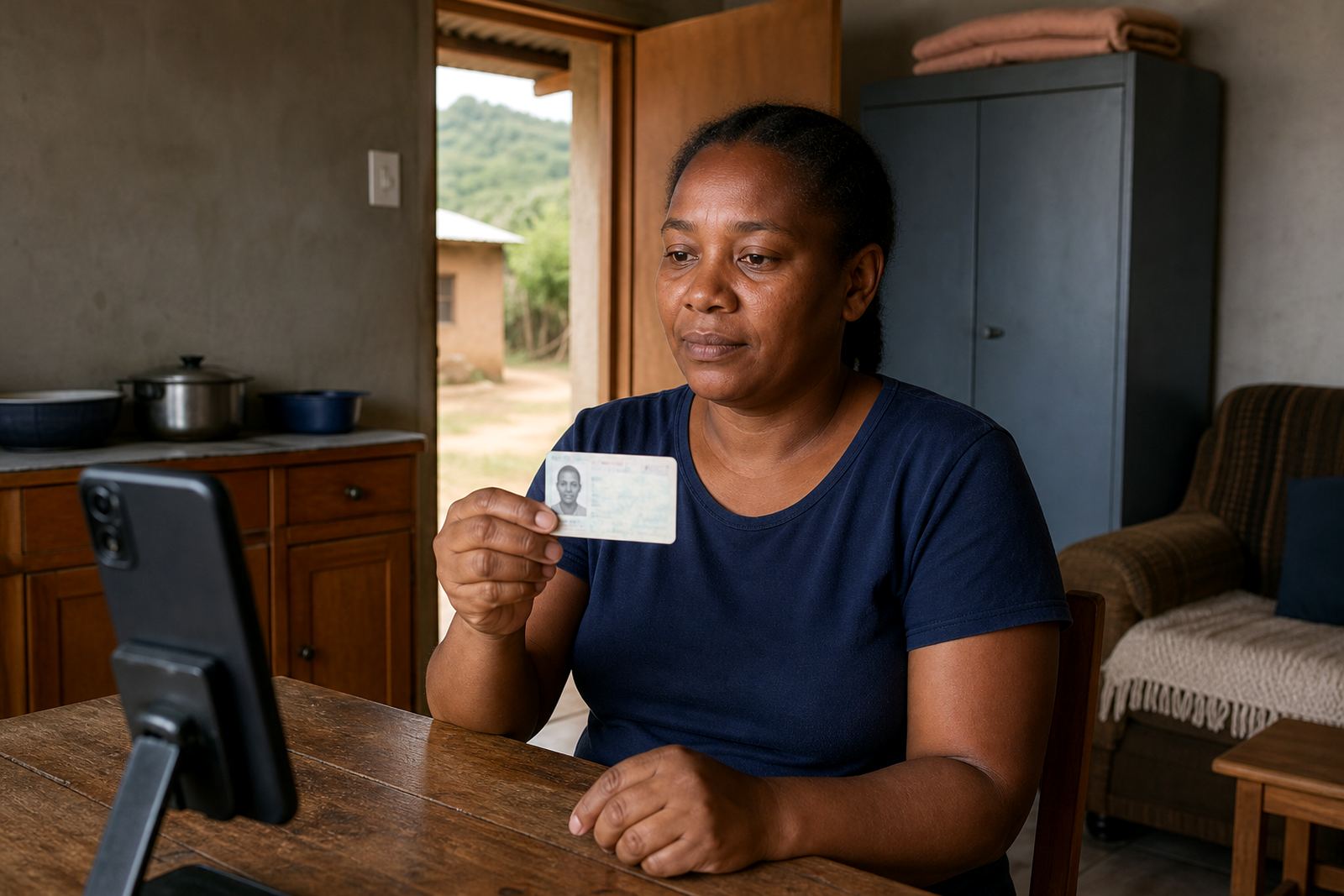
Our verification work starts with a short guided video session where a customer is taken through the steps in a structured way. The agent checks the ID document, compares the face to the document image and looks for signs that the person and the document belong together. Where the process calls for it, liveness checks are built into the session so the interaction is not just a static picture review.

This service suits businesses that want a clear verification step before opening an account, approving access or moving a client further into an onboarding flow. The session format keeps the process practical for customers in Johannesburg, Pretoria, Cape Town, Durban and Gqeberha, while the business keeps a record of what was checked and when.

Services that support the full verification flow

Different teams need different levels of help, so the service range is set out around the parts of the workflow that usually need attention. Some businesses need help with the first map of the process, others want support with the technical link-up and some need help once the service is live and staff are using it day to day.

  • Workflow Mapping for the steps from sign-up to review
  • Integration Planning and API Coordination for systems work
  • Staff Training and Refresh Training for internal teams
  • Agent Script Design for consistent checks and prompts
  • Quality Monitoring and Escalation Design for flagged cases

Choosing the right service for your operation

A small onboarding team may only need a light process with guided checks and a clean escalation path. A larger operation often needs integration planning, script design and reporting so different departments can work from the same rules. If your business handles account opening, credit checks or customer activation online, the right mix usually depends on how many people touch the file and where the handover points sit.

Some clients only want operational support around the verification session itself. Others need a wider setup that covers pilot launch support, go live stabilising and change request support once the process starts moving through real customer files.

Operational support after the first sessions

Once a verification flow is running, the pressure usually shifts to consistency. Agents need the same prompts, supervisors need clean notes and client teams need reporting that shows where files pause or move out of sequence. We handle that practical layer with quality monitoring, escalation design and operational reporting that keeps the process readable.

That support matters when the business is handling customers across several provinces and needs one method that still works for the team in the office and the team reviewing files remotely. The aim is not noise, just a process that stays legible when volume picks up.

  • Pilot launch support for the first live cases
  • Go live stabilising for early operational issues
  • Operational reporting for review and supervision
  • Change request support when the workflow shifts

Training that helps staff handle the process properly

Verification only works properly when the people handling it know what to look for and how to record it. Our staff training covers the live session flow, document capture points, facial comparison basics, liveness cues and the way to escalate a doubtful case without creating confusion for the customer. Training also helps new staff settle into the wording and timing of the script.

For teams that already have a working process, refresh training keeps the method consistent after staff changes or process updates. It is useful where a business has more than one branch or where the verification team and the onboarding team are not sitting in the same place.

Record keeping, consent and customer handling

Remote verification has to be handled with care, especially where identity documents and video records are involved. The process includes customer consent, record keeping and a practical approach to keeping the evidence trail in order for internal due diligence and audit purposes. That is part of the service design, not an afterthought.

We also keep the customer experience straightforward. The session is guided, the prompts are clear and the checks are done in a way that respects the time of the person on camera while still giving the business the verification detail it needs.

Where the service fits across South Africa

PersonVideo ID works with businesses in Rosebank and across South Africa, including Johannesburg, Pretoria, Cape Town, Durban, Gqeberha, Midrand and Sandton. The setup suits online onboarding teams that want a remote verification path rather than a face-to-face branch appointment for every file.

If your operation needs help with workflow mapping, integration planning or training around video identity checks, our contact form is the place to start. The listing cards here set out the service areas separately, so the hub gives you the full picture before you move into a narrower brief.

Video check questions

What happens during a remote video identity check?

A customer joins a guided video session, shows an ID document and the agent checks the document details against the person on screen. The process can include liveness checks, consent and record keeping for the business file.

Which services help when we are setting up the process?

Workflow Mapping, Integration Planning, API Coordination and Agent Script Design are useful at the setup stage. They help the verification flow fit with the rest of the onboarding process.

Can training be updated after the service is already in use?

Yes. Staff Training and Refresh Training are useful when teams change, the process is adjusted or new supervisors need the same method. Change Request Support can also help when the workflow needs to be revised.

Onboarding customers online? See how a video check runs.

Contact form